CentOS系统安装之后并不能立即投入生产环境使用,往往需要先经过我们运维人员的优化才行。在此讲解几点关于Linux系统安装后的基础优化操作。注意:本次优化都是基于CentOS(5.8/6.4)。
下面我就为大家简单讲解几点关于Linux系统安装后的基础优化操作。
注意:本次优化都是基于CentOS(5.8/6.4)。关于5.8和6.4两者优化时的小区别,我会在文中提及的。
优化条目:
|
1
2
3
4
5
6
7
8
9
10
11
12
13
|
修改ip地址、网关、主机名、DNS等
关闭selinux,清空iptables
添加普通用户并进行sudo授权管理
更新yum源及必要软件安装
定时自动更新服务器时间
精简开机自启动服务
定时自动清理/var/spool/clientmqueue/目录垃圾文件,放置inode节点被占满
变更默认的ssh服务端口,禁止root用户远程连接
锁定关键文件系统
调整文件描述符大小
调整字符集,使其支持中文
去除系统及内核版本登录前的屏幕显示
内核参数优化
|
1、修改ip地址、网关、主机名、DNS等
|
1
2
3
4
5
6
7
8
9
10
11
12
13
14
15
16
17
18
19
20
21
22
23
24
25
26
27
28
29
30
31
|
[root@localhost ~]# vi /etc/sysconfig/network-scripts/ifcfg-eth0
DEVICE=eth0 #网卡名字
BOOTPROTO=static #静态IP地址获取状态 如:DHCP表示自动获取IP地址
IPADDR=192.168.1.113 #IP地址
NETMASK=255.255.255.0 #子网掩码
ONBOOT=yes#引导时是否激活
GATEWAY=192.168.1.1
[root@localhost ~]# cat /etc/sysconfig/network-scripts/ifcfg-eth0
DEVICE=eth0
BOOTPROTO=static
IPADDR=192.168.1.113
NETMASK=255.255.255.0
ONBOOT=yes
GATEWAY=192.168.1.1
[root@localhost ~]# vi /etc/sysconfig/network
HOSTNAME=c64 #修改主机名,重启生效
GATEWAY=192.168.1.1 #修改默认网关,如果上面eth0里面不配置网关的话,默认就使用这里的网关了。
[root@localhost ~]# cat /etc/sysconfig/network
HOSTNAME=c64
GATEWAY=192.168.1.1
我们也可以用 hostnamec64 来临时修改主机名,重新登录生效
修改DNS
[root@localhost ~]# vi /etc/resolv.conf #修改DNS信息
nameserver 114.114.114.114
nameserver 8.8.8.8
[root@localhost ~]# cat /etc/resolv.conf #查看修改后的DNS信息
nameserver 114.114.114.114
nameserver 8.8.8.8
[root@localhost ~]# service network restart #重启网卡,生效
重启网卡,也可以用下面的命令
[root@localhost ~]# /etc/init.d/network restart
|
2、关闭selinux,清空iptables
关闭selinux
|
1
2
3
4
5
6
|
[root@c64 ~]# sed –i ‘s/SELINUX=enforcing/SELINUX=disabled/g’ /etc/selinux/config #修改配置文件则永久生效,但是必须要重启系统。
[root@c64 ~]# grep SELINUX=disabled /etc/selinux/config
SELINUX=disabled #查看更改后的结果
[root@c64 ~]# setenforce 0#临时生效命令
[root@c64 ~]# getenforce #查看selinux当前状态
Permissive
|
清空iptables
|
1
2
3
4
5
6
7
8
9
|
[root@c64 ~]# iptables –F #清理防火墙规则
[root@c64 ~]# iptables –L #查看防火墙规则
Chain INPUT (policy ACCEPT)
target prot opt source destination
Chain FORWARD (policy ACCEPT)
target prot opt source destination
Chain OUTPUT (policy ACCEPT)
target prot opt source destination
[root@c64 ~]#/etc/init.d/iptables save #保存防火墙配置信息
|
3、添加普通用户并进行sudo授权管理
|
1
2
3
4
5
|
[root@c64 ~]# useradd sunsky
[root@c64 ~]# echo "123456"|passwd --stdin sunsky&&history –c
[root@c64 ~]# visudo
在root ALL=(ALL) ALL此行下,添加如下内容
sunsky ALL=(ALL) ALL
|
4、更新yum源及必要软件安装
yum安装软件,默认获取rpm包的途径从国外官方源,改成国内的源。
国内较快的两个站点:搜狐镜像站点、网易镜像站点
法1:自己配置好安装源配置文件,然后上传到linux。
法2:使用镜像站点配置好的yum安装源配置文件
|
1
2
3
|
[root@c64 ~]# cd /etc/yum.repos.d/
[root@c64 yum.repos.d]# /bin/mv CentOS-Base.repo CentOS-Base.repo.bak
[root@c64 yum.repos.d]# wget http:
|
接下来执行如下命令,检测yum是否正常
|
1
2
|
[root@c64 yum.repos.d]# yum clean all #清空yum缓存
[root@c64 yum.repos.d]# yum makecache #建立yum缓存
|
然后使用如下命令将系统更新到最新
|
1
2
|
[root@c64 yum.repos.d]# rpm --import /etc/pki/rpm-gpg/RPM-GPG-KEY* #导入签名KEY到RPM
[root@c64 yum.repos.d]# yum upgrade-y #更新系统内核到最新
|
接下来就要安装几个必要的软件了
|
1
|
[root@c64 yum.repos.d]# yum install lrzsz ntpdate sysstat -y
|
lrzsz是一个上传下载的软件
sysstat是用来检测系统性能及效率的工具
5、定时自动更新服务器时间
|
1
2
|
[root@c64 ~]# echo '*/5 * * * * /usr/sbin/ntpdate time.windows.com >/dev/null 2 >&1'>>/var/spool/cron/root
[root@c64 ~]# echo '*/10 * * * * /usr/sbin/ntpdate time.nist.gov >/dev/null 2>&1'>>/var/spool/cron/root
|
提示:CentOS 6.4的时间同步命令路径不一样
6是/usr/sbin/ntpdate
5是/sbin/ntpdate
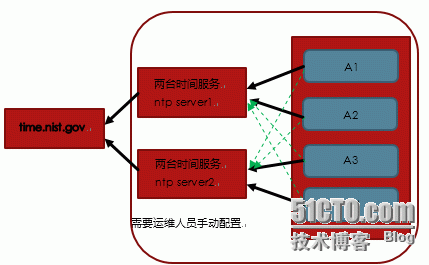
扩展:在机器数量少时,以上定时任务同步时间就可以了。如果机器数量大时,可以在网内另外部署一台时间同步服务器NTP Server。此处仅提及,不做部署。
时间同步服务器架构图:
6、精简开机自启动服务
刚装完操作系统可以只保留crond,network,syslog,sshd这四个服务。(Centos6.4为rsyslog)
|
1
2
3
4
5
6
7
|
[root@c64 ~]# for sun in `chkconfig --list|grep 3:on|awk '{print $1}'`;do chkconfig --level 3$sun off;done
[root@c64 ~]# for sun in crond rsyslog sshd network;do chkconfig --level 3 $sun on;done
[root@c64 ~]# chkconfig --list|grep 3:on
crond 0:off 1:off 2:on 3:on 4:on 5:on 6:off
network 0:off 1:off 2:on 3:on 4:on 5:on 6:off
rsyslog 0:off 1:off 2:on 3:on 4:on 5:on 6:off
sshd 0:off 1:off 2:on 3:on 4:on 5:on 6:off
|
7、定时自动清理/var/spool/clientmqueue/目录垃圾文件,放置inode节点被占满
本优化点,在6.4上可以忽略不需要操作即可!
|
1
2
3
4
|
[root@c64 ~]# mkdir /server/scripts -p
[root@c64 ~]# vi /server/scripts/spool_clean.sh
#!/bin/sh
find/var/spool/clientmqueue/-typef -mtime +30|xargsrm-f
|
然后将其加入到crontab定时任务中
|
1
|
[root@c64 ~]# echo '*/30 * * * * /bin/sh /server/scripts/spool_clean.sh >/dev/null 2>&1'>>/var/spool/cron/root
|
8、变更默认的ssh服务端口,禁止root用户远程连接
|
1
2
3
4
5
6
7
8
9
|
[root@c64 ~]# cp /etc/ssh/sshd_config /etc/ssh/sshd_config.bak
[root@c64 ~]# vim /etc/ssh/sshd_config
Port 52113#ssh连接默认的端口
PermitRootLogin no #root用户黑客都知道,禁止它远程登录
PermitEmptyPasswords no #禁止空密码登录
UseDNS no #不使用DNS
[root@c64 ~]# /etc/init.d/sshd reload #从新加载配置
[root@c64 ~]# netstat -lnt #查看端口信息
[root@c64 ~]# lsof -i tcp:52113
|
9、锁定关键文件系统
|
1
2
3
4
5
|
[root@c64 ~]# chattr +i /etc/passwd
[root@c64 ~]# chattr +i /etc/inittab
[root@c64 ~]# chattr +i /etc/group
[root@c64 ~]# chattr +i /etc/shadow
[root@c64 ~]# chattr +i /etc/gshadow
|
使用chattr命令后,为了安全我们需要将其改名
|
1
|
[root@c64 ~]# /bin/mv /usr/bin/chattr /usr/bin/任意名称
|
10、调整文件描述符大小
|
1
2
3
|
[root@localhost ~]# ulimit –n #查看文件描述符大小
1024
[root@localhost ~]# echo '* - nofile 65535' >> /etc/security/limits.conf
|
配置完成后,重新登录即可查看。
提示:也可以把ulimit -SHn 65535命令加入到/etc/rc.local,然后每次重启生效
|
1
2
3
4
5
6
|
[root@c64 ~]# cat >>/etc/rc.local<<EOF
#open files
ulimit -HSn 65535
#stack size
ulimit -s 65535
EOF
|
扩展:文件描述符
文件描述符在形式上是一个非负整数。实际上,它是一个索引值,指向内核为每一个进程所维护的该进程打开文件的记录表。当程序打开一个现有文件或者创建一个新文件时,内核向进程返回一个文件描述符。在程序设计中,一些涉及底层的程序编写往往会围绕着文件描述符展开。但是文件描述符这一概念往往只适用于Unix、Linux这样的操作系统。
习惯上,标准输入(standard input)的文件描述符是 0,标准输出(standard output)是 1,标准错误(standard error)是 2。尽管这种习惯并非Unix内核的特性,但是因为一些 shell 和很多应用程序都使用这种习惯,因此,如果内核不遵循这种习惯的话,很多应用程序将不能使用。
11、调整字符集,使其支持中文
|
1
2
|
sed-i 's#LANG="en_US.UTF-8"#LANG="zh_CN.GB18030"#'/etc/sysconfig/i18n
source/etc/sysconfig/i18n
|
扩展:什么是字符集?
简单的说就是一套文字符号及其编码。常用的字符集有:
GBK 定长双字节不是国际标准,支持系统不少
UTF-8 非定长 1-4字节广泛支持,MYSQL也使用UTF-8
12、去除系统及内核版本登录前的屏幕显示
|
1
2
|
[root@c64 ~]# >/etc/redhat-release
[root@c64 ~]# >/etc/issue
|
13、内核参数优化
说明:本优化适合apache,nginx,squid多种等web应用,特殊的业务也可能需要略作调整。
|
1
2
3
4
5
6
7
8
9
10
11
12
13
14
15
16
17
18
19
20
21
22
23
24
|
[root@c64 ~]# vi /etc/sysctl.conf
#by sun in 20131001
net.ipv4.tcp_fin_timeout = 2
net.ipv4.tcp_tw_reuse = 1
net.ipv4.tcp_tw_recycle = 1
net.ipv4.tcp_syncookies = 1
net.ipv4.tcp_keepalive_time =600
net.ipv4.ip_local_port_range = 4000 65000
net.ipv4.tcp_max_syn_backlog = 16384
net.ipv4.tcp_max_tw_buckets = 36000
net.ipv4.route.gc_timeout = 100
net.ipv4.tcp_syn_retries = 1
net.ipv4.tcp_synack_retries = 1
net.core.somaxconn = 16384
net.core.netdev_max_backlog = 16384
net.ipv4.tcp_max_orphans = 16384
#一下参数是对iptables防火墙的优化,防火墙不开会有提示,可以忽略不理。
net.ipv4.ip_conntrack_max = 25000000
net.ipv4.netfilter.ip_conntrack_max = 25000000
net.ipv4.netfilter.ip_conntrack_tcp_timeout_established = 180
net.ipv4.netfilter.ip_conntrack_tcp_timeout_time_wait = 120
net.ipv4.netfilter.ip_conntrack_tcp_timeout_close_wait = 60
net.ipv4.netfilter.ip_conntrack_tcp_timeout_fin_wait = 120
[root@localhost ~]# sysctl –p #使配置文件生效
|
提示:由于CentOS6.X系统中的模块名不是ip_conntrack,而是nf_conntrack,所以在/etc/sysctl.conf优化时,需要把net.ipv4.netfilter.ip_conntrack_max 这种老的参数,改成net.netfilter.nf_conntrack_max这样才可以。
即对防火墙的优化,在5.8上是
|
1
2
3
4
5
6
|
net.ipv4.ip_conntrack_max = 25000000
net.ipv4.netfilter.ip_conntrack_max = 25000000
net.ipv4.netfilter.ip_conntrack_tcp_timeout_established = 180
net.ipv4.netfilter.ip_conntrack_tcp_timeout_time_wait = 120
net.ipv4.netfilter.ip_conntrack_tcp_timeout_close_wait = 60
net.ipv4.netfilter.ip_conntrack_tcp_timeout_fin_wait = 120
|
在6.4上是
|
1
2
3
4
5
6
|
net.nf_conntrack_max = 25000000
net.netfilter.nf_conntrack_max = 25000000
net.netfilter.nf_conntrack_tcp_timeout_established = 180
net.netfilter.nf_conntrack_tcp_timeout_time_wait = 120
net.netfilter.nf_conntrack_tcp_timeout_close_wait = 60
net.netfilter.nf_conntrack_tcp_timeout_fin_wait = 120
|
另外,在此优化过程中可能会有报错:
1、5.8版本上
|
1
2
3
4
5
6
|
error: "net.ipv4.ip_conntrack_max"is an unknown key
error: "net.ipv4.netfilter.ip_conntrack_max"is an unknown key
error: "net.ipv4.netfilter.ip_conntrack_tcp_timeout_established"is an unknown key
error: "net.ipv4.netfilter.ip_conntrack_tcp_timeout_time_wait"is an unknown key
error: "net.ipv4.netfilter.ip_conntrack_tcp_timeout_close_wait"is an unknown key
error: "net.ipv4.netfilter.ip_conntrack_tcp_timeout_fin_wait"is an unknown key
|
这个错误可能是你的防火墙没有开启或者自动处理可载入的模块ip_conntrack没有自动载入,解决办法有二,一是开启防火墙,二是自动处理开载入的模块ip_conntrack
|
1
2
|
modprobe ip_conntrack
echo "modprobe ip_conntrack">> /etc/rc.local
|
2、6.4版本上
|
1
2
3
4
5
6
|
error: "net.nf_conntrack_max"isan unknown key
error: "net.netfilter.nf_conntrack_max"isan unknown key
error: "net.netfilter.nf_conntrack_tcp_timeout_established"isan unknown key
error: "net.netfilter.nf_conntrack_tcp_timeout_time_wait"isan unknown key
error: "net.netfilter.nf_conntrack_tcp_timeout_close_wait"isan unknown key
error: "net.netfilter.nf_conntrack_tcp_timeout_fin_wait"isan unknown key
|
这个错误可能是你的防火墙没有开启或者自动处理可载入的模块ip_conntrack没有自动载入,解决办法有二,一是开启防火墙,二是自动处理开载入的模块ip_conntrack
|
1
2
|
modprobe nf_conntrack
echo "modprobe nf_conntrack">> /etc/rc.local
|
3、6.4版本上
|
1
2
3
|
error: "net.bridge.bridge-nf-call-ip6tables"isan unknown key
error: "net.bridge.bridge-nf-call-iptables"isan unknown key
error: "net.bridge.bridge-nf-call-arptables"isan unknown key
|
这个错误是由于自动处理可载入的模块bridge没有自动载入,解决办法是自动处理开载入的模块ip_conntrack
|
1
2
|
modprobe bridge
echo "modprobe bridge">> /etc/rc.local
|
到此,我们Linux系统安装后的基础优化已经操作的差不多了,总结下来一共有13个优化点需要我们来熟知。后面我会出一个一键优化的shell脚本出来和大家一起交流学习。