centos7部署LAMP+xcache
时间:2016-07-21 01:49 来源:linux.it.net.cn 作者:IT
[root@bogon ~]# yum -y install httpd php php-mysql mariadb-server
[root@bogon ~]# rpm -q php
php-5.4.16-36.1.el7_2.1.x86_64
[root@bogon ~]#
[root@bogon ~]# rpm -q httpd
httpd-2.4.6-40.el7.centos.1.x86_64
[root@bogon ~]#
[root@bogon ~]# rpm -q php-mysql
php-mysql-5.4.16-36.1.el7_2.1.x86_64
[root@bogon ~]#
[root@bogon ~]# rpm -q mariadb-server
mariadb-server-5.5.47-1.el7_2.x86_64
[root@bogon ~]#
[root@bogon ~]# rpm -q mariadb
mariadb-5.5.47-1.el7_2.x86_64
启动httpd服务的时候最好是添加下以下一条,否则要解析,启动老慢了
[root@bogon ~]# vim /etc/httpd/conf/httpd.conf
ServerName localhost:80
[root@bogon ~]# systemctl start httpd.service
[root@bogon ~]# systemctl start mariadb.service
[root@bogon ~]# ss -tnl ####查看下监听地址是否正常
State Recv-Q Send-Q Local Address:Port
LISTEN 0 50 *:3306 ##监听的mysql端口
LISTEN 0 5 192.168.122.1:53
LISTEN 0 128 *:22
LISTEN 0 128 :::80 ##监听的httpd服务端口
[root@bogon ~]# vim /etc/httpd/conf.d/vhost1.conf ###第一个虚拟主机
<VirtualHost 192.168.1.104:80>
DocumentRoot /data/www1/vhost1
ServerName wp.magedu.com
ErrorLog "/var/log/www1/vhost1/error_log" ##错误日志
CustomLog "/var/log/www1/vhost1/access_log" common ###访问日志
<Directory "/data/www1/vhost1">
Options None
AllowOverride None
Require all granted ##此处需要授权,否则无法访网页
</Directory>
</VirtualHost>
[root@bogon ~]# vim /etc/httpd/conf.d/vhost2.conf ###第二个虚拟主机
<VirtualHost 192.168.1.104:80>
DocumentRoot /data/www2/vhost2
ServerName pma.magedu.com
ErrorLog "/var/log/www2/vhost2/error_log"
CustomLog "/var/log/www2/vhost2/access_log" common
<Directory "/data/www2/vhost2">
Options None
AllowOverride None
Require all granted
</Directory>
</VirtualHost>
[root@bogon ~]# mkdir -p /data/www1/vhost1 #####DocumentRoot路径
[root@bogon ~]# mkdir -p /data/www2/vhost2
[root@bogon ~]# echo "vhost1" > /data/www1/vhost1/index.html ###网页路径
[root@bogon ~]# echo "vhost2" > /data/www2/vhost2/index.html
[root@bogon ~]# mkdir -p /var/log/www1/vhost1 ###日志路径
[root@bogon ~]# mkdir -p /var/log/www2/vhost2
[root@bogon ~]# httpd -t
Syntax OK
[root@bogon ~]# systemctl reload httpd.service
注:由于我们有搭建DNS所有此处我就把相关的信息给写在了hosts文件中了
[root@bogon ~]# vim /data/www1/vhost1/index.php
<?php
phpinfo();
?>
<?php
$conn = mysql_connect('192.168.1.104','test','test');
if ($conn)
echo "mysql is ok";
else
echo "mysql is bad";
phpinfo();
?>
此时测试肯定是不成功的我没有mysq授权用户
MariaDB [(none)]> create database wpdb
MariaDB [(none)]> grant all on wpdb.* to 'test'@'192.168.%.%' identified by 'test';
首先我们部署WordPress在第一个wp.magedu.com虚拟主机上
[root@bogon ~]# unzip phpMyAdmin-4.0.5-all-languages.zip
[root@bogon ~]# cp -r wordpress /data/www1/vhost1/
[root@bogon wordpress]# cp wp-config-sample.php wp-config.php
[root@bogon wordpress]# vim wp-config.php
/** WordPress数据库的名称 */
define('DB_NAME', 'wpdb');
/** MySQL数据库用户名 */
define('DB_USER', 'test');
/** MySQL数据库密码 */
define('DB_PASSWORD', 'test');
/** MySQL主机 */
define('DB_HOST', '192.168.1.104');
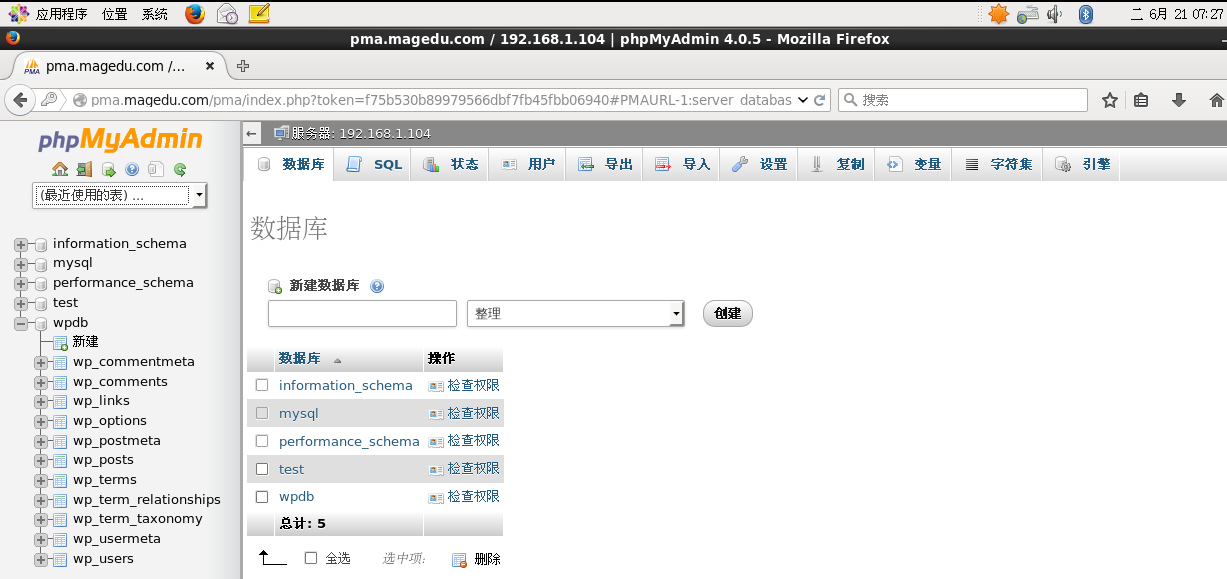
[root@bogon ~]# mv phpMyAdmin-4.0.5-all-languages /data/www2/vhost2/
[root@bogon libraries]# cd phpMyAdmin-4.0.5-all-languages/libraries/
[root@bogon libraries]# vim config.default.php
$cfg['blowfish_secret'] = 'W1rBVqdwufYEiymPTfOsUQ';
$cfg['Servers'][$i]['host'] = '192.168.1.104';
$cfg['Servers'][$i]['user'] = 'test';
$cfg['Servers'][$i]['password'] = 'test';
[root@bogon ~]# yum -y install php-mbstring
[root@bogon ~]# systemctl reload httpd
MariaDB [(none)]> grant all on *.* to 'test'@'192.168.%.%' identified by 'test';
Document Path: /wordpress
Document Length: 453 bytes
Concurrency Level: 100
Time taken for tests: 3.756 seconds
Complete requests: 1000
Failed requests: 0
Write errors: 0
Total transferred: 679000 bytes
HTML transferred: 453000 bytes
Requests per second: 266.28 [#/sec] (mean)
Time per request: 375.551 [ms] (mean)
Time per request: 3.756 [ms] (mean, across all concurrent requests)
Transfer rate: 176.56 [Kbytes/sec] received
Connection Times (ms)
min mean[+/-sd] median max
Connect: 3 123 316.7 11 1151
Processing: 4 51 131.4 11 2272
Waiting: 4 45 111.4 11 2272
Total: 9 174 350.8 30 3399
Percentage of the requests served within a certain time (ms)
50% 30
66% 39
75% 47
80% 223
90% 1015
95% 1030
98% 1223
99% 1228
100% 3399 (longest request)
[root@bogon ~]# yum list | grep php-xcache
php-xcache.x86_64 3.1.1-1.el7 epel
[root@bogon ~]# yum -y install php-xcache
[root@bogon ~]# cd /etc/php.d/
[root@bogon php.d]# ls
curl.ini fileinfo.ini json.ini mbstring.ini mysqli.ini mysql.ini pdo.ini
pdo_mysql.ini pdo_sqlite.ini phar.ini sqlite3.ini xcache.ini zip.ini
###安装后生成xcache.ini文件
而且我们php测试页面中也可以看到有xcache加载
[root@bogon ~]# vim /etc/php.d/xcache.ini
xcache.size = 300M ####修改下缓存的大小
Document Path: /wordpress
Document Length: 453 bytes
Concurrency Level: 100
Time taken for tests: 2.133 seconds ##所有请求处理完成花费时间
Complete requests: 1000 ##完成请求数
Failed requests: 0 ##失败数
Write errors: 0
Total transferred: 679000 bytes
HTML transferred: 453000 bytes
Requests per second: 468.82 [#/sec] (mean) ##每秒请求数的吞吐
Time per request: 213.303 [ms] (mean) ###服务器收到请求响应页面花费时间
Time per request: 2.133 [ms] (mean, across all concurrent requests)#并发每个消耗时间
Transfer rate: 310.87 [Kbytes/sec] received ###平均每秒流量
Connection Times (ms)
min mean[+/-sd] median max
Connect: 4 68 225.0 15 1014
Processing: 4 56 95.2 20 470
Waiting: 4 55 95.5 19 470
Total: 9 124 259.4 38 1432
Percentage of the requests served within a certain time (ms)
50% 38
66% 44
75% 49
80% 54
90% 256
95% 1015
98% 1224
99% 1228
100% 1432 (longest request)
(责任编辑:IT)
(责任编辑:IT) |